Deep dive
Anatomy of an Alert Worth Acting On
A useful alert is a decision-ready briefing: seven questions every operational alert should answer.

In our previous article, we looked at when an alert should fire: how intelligent alerting weighs expected behaviour, business impact, persistence, urgency and actionability to decide which conditions deserve attention.
This article looks at the next question: once a condition deserves attention, what should the alert actually say?
It is one of the most practical improvements an operation can make. The same underlying data can produce an alert that prompts a ten-minute investigation or one that supports a decision in under a minute. The difference lies in design, and the design starts with the decision the recipient needs to make.
Most alerts are designed from the data outward: pick a metric, set a limit, notify when it is crossed. That approach is quick to build and remains valuable for clear, deterministic conditions.
Decision-first design works from the other direction. It begins with the person receiving the alert and the choice in front of them, then asks what information they need to make that choice well and in time.
| Threshold-first design asks… | Decision-first design also asks… |
| Which metric should we watch? | Which decision should this alert improve? |
| What is the limit? | How much time is there to act, and what is at stake? |
| Who should be notified? | Who has the responsibility and authority to respond? |
| Did the alert fire correctly? | Did the decision, and the outcome, improve? |
The result is an alert that reads less like a notification and more like a short briefing from a well-informed colleague.
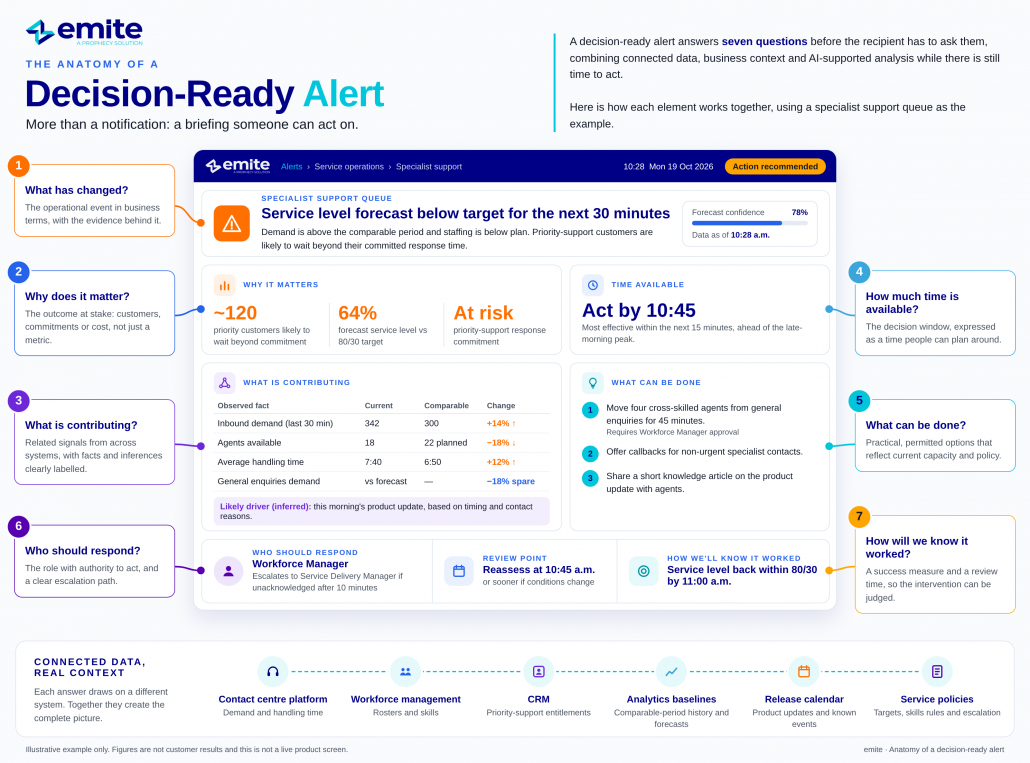
Each of the seven questions below removes a step the recipient would otherwise have to take before they could act. The examples follow a single illustrative condition in a specialist support queue.
The operational event, stated plainly, with the evidence behind it. The opening line should tell the recipient what is happening in business terms, not just which metric moved.
Design tip: name the affected service, team or location specifically. “Specialist support queue” is actionable; “Queue 14” may not be.
In practice: “Service level in the specialist support queue is forecast to remain below target for the next 30 minutes.”
The business outcome at stake. A metric is a proxy; the recipient acts on what the metric represents: customers waiting, a commitment at risk, a cost increasing.
Design tip: connect the condition to an outcome the recipient is accountable for, and quantify it where the data supports it.
In practice: “Customers with priority support entitlements are likely to wait beyond their committed response time.”
The related signals that explain the condition. This is where connected data earns its value, drawing on demand, capacity, handling times and upstream events from different systems.
Design tip: separate verified facts from likely contributors. “Demand is 14% above the comparable period” is a fact; “a product update is the likely driver” is an inference and should read as one.
In practice: “Demand is 14% above the comparable period and available staffing is below plan.”
The decision window: how long the recipient has before intervention loses its value, and when escalation will be needed.
Design tip: express time in terms the recipient can plan around, such as “within the next 30 minutes” or “before the 2:00 p.m. peak”.
In practice: “Without intervention, the condition is expected to persist for at least 30 minutes.”
Practical, permitted options, with any constraints that apply. Recommendations should reflect what the organisation can actually do, not what would be ideal in theory.
Design tip: draw options from approved workflows and current capacity. If reallocating staff would put another service at risk, say so.
In practice: “Temporary assistance from appropriately skilled agents in general enquiries may reduce the risk of further deterioration.”
The role with the responsibility and authority to act. An alert sent to everyone is often acted on by no one.
Design tip: route by role and accountability rather than distribution list, with a defined escalation path if the alert is not acknowledged.
In practice: “Owner: Workforce Manager. Escalates to Service Delivery Manager if unacknowledged after 10 minutes.”
The success measure and the review point. Every alert should close the loop: what should improve, when to check, and what would trigger reassessment.
Design tip: include a specific review time. It turns the alert from a one-off message into the start of a managed intervention.
In practice: “Recommended action: review available cross-skilled capacity and reassess service performance after 15 minutes.”
Assembled, the seven answers form a compact briefing. Each part maps to one of the questions above.
| 1 | What changed | Service level in the specialist support queue is forecast to remain below target for the next 30 minutes. |
| 2 | Why it matters | Priority-support customers are likely to wait beyond their committed response time. |
| 3 | Contributors | Demand is 14% above the comparable period (verified). Available staffing is below plan (verified). A morning product update is a likely driver (inferred). |
| 4 | Time available | Intervention is most effective within the next 15 minutes, ahead of the late-morning peak. |
| 5 | Options | Temporary assistance from cross-skilled agents in general enquiries, which is currently below forecast demand. Callback offer for non-urgent contacts. |
| 6 | Owner | Workforce Manager. Escalates to Service Delivery Manager if unacknowledged after 10 minutes. |
| 7 | Success and review | Service level back within target by 11:00 a.m. Reassess at 10:45 a.m. Data current as of 10:28 a.m. |
Illustrative example. All figures are examples, not customer results.
The seven answers rarely reach people in one format. A manager may first see the alert as a phone notification, then discuss it in a team chat, then open the full picture on a dashboard. Each channel carries a different slice of the same briefing.
| Mobile notification
Questions 1, 4 and 5 · one line “Specialist support: service level forecast below target for 30 min. Review cross-skilled capacity by 10:45.” Goal: decide whether to open it now. |
Team chat message
Questions 1–6 · a short card Headline as above, plus: • Demand +14% vs comparable period • Staffing below plan (2 unplanned absences) • General enquiries 18% below forecast [Approve reallocation] [View evidence] [Snooze 15 min] Goal: agree and act together. |
Operational dashboard
All seven questions · full briefing The complete anatomy above, with the evidence charted against its baseline, data freshness shown, and the review time counting down. Goal: verify, adjust and track the outcome. |
The rule that makes this work is borrowed from journalism: the inverted pyramid. The most important information comes first, so the headline must stand on its own if the recipient reads nothing else. Both the Nielsen Norman Group and the Australian Government Style Manual recommend this structure for content people scan under time pressure, which describes almost every operational alert.
The seven questions are industry-neutral. What changes is the data behind each answer and the options available to the person responding.
| Industry | What changed | Why it matters | Permitted option | Owner |
| Contact centre | Priority queue forecast below target | Committed response times at risk | Reallocate cross-skilled agents | Workforce manager |
| Field service | Open jobs rising as two technicians go off shift | Same-day appointment commitments at risk | Extend shifts or reschedule low-priority jobs | Dispatch lead |
| Retail fulfilment | Order volume spike coinciding with carrier delay | Next-day delivery promise at risk | Switch carrier or adjust cut-off messaging | Fulfilment manager |
| Utilities | Outage reports clustering in one network area | Customer enquiries and restoration targets | Proactive outage notification; field crew priority | Network operations lead |
| Healthcare | Referrals approaching initial-contact target | Patients waiting longer for first contact | Cross-location capacity; trained staff reassignment | Patient access manager |
For a detailed walkthrough of the healthcare example, including the six data sources behind the alert and the clinical guardrails that apply, see our patient access use case.


A decision-ready alert draws on three distinct contributions. Keeping them clear is what makes the alert both useful and trustworthy.
| Contributor | Role in the alert | Example |
| AI and analytics | Interpret related signals, estimate impact and time, and explain the condition in accessible language | Recognising that volume, handling time and staffing describe one developing condition |
| Governed business rules | Determine which interventions are valid, who owns them and what requires approval | Only agents with the required skills can be reallocated; escalation after 10 minutes |
| People | Apply judgement, make the decision and remain accountable for it | The workforce manager weighs the trade-off with another queue and approves the change |
The NIST AI Risk Management Framework offers a useful structure for this division of responsibility, including defining human oversight, measuring AI performance and monitoring behaviour in production.
Small wording choices decide whether an alert prompts action or a follow-up question. These substitutions come up again and again when teams redesign their alerts.
| Instead of… | Write… | Why it helps |
| “High volume” | “Demand 14% above the comparable Monday” | A comparator tells the reader how unusual the movement is |
| “SL breach imminent” | “Service level forecast below 80/30 from 10:45” | States the target and the time, without jargon |
| “Queue 14” | “Specialist support queue” | Readers act on services they recognise, not system IDs |
| “Investigate staffing” | “Review cross-skilled capacity in general enquiries” | Names a specific, feasible next step |
| “ASAP” | “Act before 10:45 to avoid escalation” | Converts urgency into a deadline people can plan around |
| “Issue resolved” | “Service level back within target at 10:52; review closed” | Confirms the outcome and closes the loop |
Choose one alert your team receives regularly and check it against the seven questions. For each, ask whether the recipient can answer it from the alert alone or has to investigate.
THE SEVEN TESTS OF A DECISION-READY ALERT
1. Change: what happened?
2. Impact: why does it matter?
3. Evidence: what is contributing?
4. Window: how long to act?
5. Action: what can we do?
6. Owner: who should respond?
7. Outcome: did it work?
Every question the alert leaves unanswered represents time spent investigating instead of acting. The Decision-Ready Alert Canvas ( see below) includes these seven tests alongside a worksheet for redesigning an alert with your team.
Every answer in a decision-ready briefing comes from somewhere: demand from the contact centre platform, capacity from workforce management, customer context from CRM, rules from service policy. emite Advanced iPaaS connects those sources, and Advanced Visualisation presents the full briefing on the dashboard where people verify and track it.
AskEmite supplies the explanatory layer: anomaly awareness, contextual explanations written in plain language and suggested next steps. When a briefing raises a question, such as “why is demand up?” or “which agents are cross-skilled?”, the recipient can ask it directly and get an answer grounded in their own data. Your data answers back.
An alert is the point where data meets a decision. Structuring it around that decision, adapting it to the channel where it will be read and choosing words that point to action turns a notification into a briefing someone can act on with confidence.
The most valuable alert is the one that helps prevent the most meaningful avoidable outcome and answers its own follow-up questions.
Scenarios and figures marked illustrative are examples, not customer results. This article is not sponsored or endorsed by any organisation mentioned.
RELATED RESOURCES


 Healthcare Patient Access: Turning Operational Signals into Timely Interven...